Cloud Migration: The Smart Business Blueprint for Moving to the Cloud in 2026
As businesses embrace digital transformation, cloud technology has become the foundation of modern IT infrastructure. Organizations of every size are replacing traditional on-premise servers with flexible, secure, and scalable cloud environments. Whether you're a startup looking to reduce infrastructure costs or a large enterprise aiming to improve operational efficiency, cloud migration has become a strategic investment rather than just a technology upgrade.
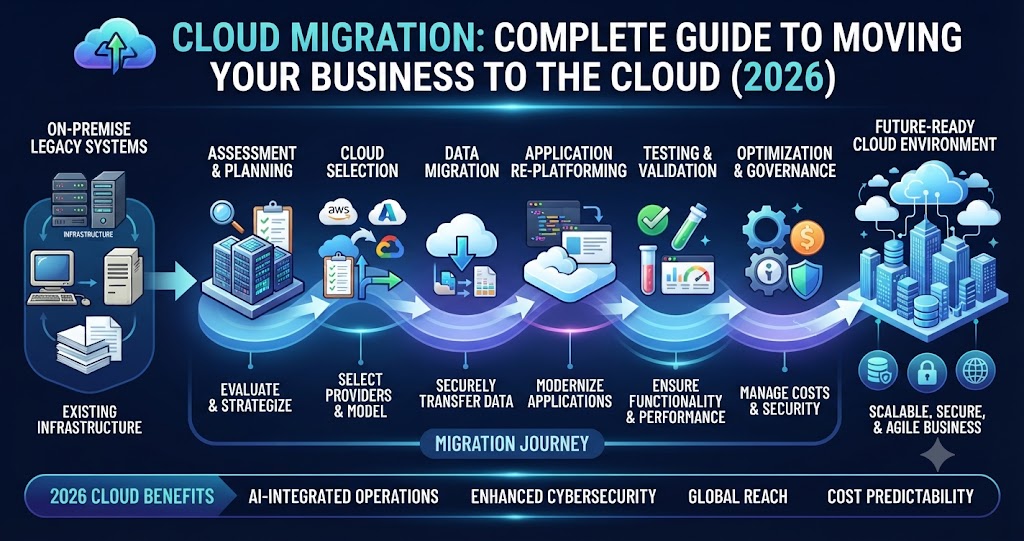
However, moving to the cloud involves much more than transferring files from one server to another. A successful cloud migration requires careful planning, selecting the right cloud platform, securing sensitive business data, minimizing downtime, and optimizing applications for long-term performance.
This guide explains everything businesses need to know about cloud migration in 2026, including its benefits, migration strategies, challenges, and best practices.
What Is Cloud Migration?
Cloud migration is the process of transferring digital assets such as applications, databases, files, workloads, and IT infrastructure from physical servers or legacy systems to a cloud computing environment.
Businesses may migrate to public cloud platforms, private cloud environments, or hybrid cloud infrastructures depending on their operational requirements and security policies.
The primary objective is to improve flexibility, enhance system performance, reduce infrastructure costs, and enable businesses to scale quickly without investing heavily in physical hardware.
Why Businesses Are Moving to the Cloud
Today's organizations operate in a highly competitive environment where speed, accessibility, and data-driven decision-making are essential. Traditional infrastructure often struggles to support modern business demands, especially when handling remote teams, growing customer bases, and rapidly changing workloads.
Cloud technology addresses these challenges by offering on-demand computing resources, automatic updates, built-in security features, and virtually unlimited scalability.
Instead of maintaining expensive physical servers, businesses can access powerful computing resources whenever they need them while paying only for what they use.
Key Benefits of Cloud Migration
Cloud migration delivers significant advantages across every department of an organization.
Lower Operational Costs
Migrating to the cloud reduces expenses related to hardware purchases, server maintenance, electricity consumption, cooling systems, and IT infrastructure upgrades. Subscription-based pricing also makes budgeting more predictable.
Better Scalability
Cloud platforms allow businesses to increase or decrease computing resources instantly. This flexibility ensures applications continue performing well during seasonal traffic spikes or rapid business growth.
Improved Security
Leading cloud providers invest heavily in cybersecurity by offering encryption, identity management, multi-factor authentication, automated backups, threat monitoring, and compliance with international security standards.
Business Continuity
Cloud environments provide automated backups and disaster recovery capabilities, helping organizations recover quickly from hardware failures, cyberattacks, or unexpected disruptions.
Remote Accessibility
Employees can securely access applications and business data from anywhere using internet-connected devices, supporting hybrid and remote work environments.
Faster Innovation
Cloud infrastructure enables businesses to deploy applications, test new features, and launch products much faster than traditional on-premise systems.
Types of Cloud Migration
Every business has unique requirements, so cloud migration strategies vary depending on existing infrastructure and long-term goals.
Rehosting (Lift and Shift): Applications are moved to the cloud with minimal changes, making this the fastest migration approach.
Replatforming: Existing applications receive minor optimizations to improve cloud performance without complete redevelopment.
Refactoring: Applications are redesigned specifically for cloud-native architecture, maximizing scalability and efficiency.
Replacing: Legacy software is replaced with modern cloud-based Software-as-a-Service (SaaS) solutions.
Selecting the right strategy depends on business objectives, budget, and technical complexity.
Common Cloud Migration Challenges
Although cloud migration offers many benefits, organizations often encounter obstacles during implementation.
Some of the most common challenges include:
- Data security concerns
- Application compatibility issues
- Unexpected downtime
- Integration with existing systems
- Cost management
- Compliance and regulatory requirements
- Employee training
- Data transfer complexity
Proper planning and experienced implementation partners significantly reduce these risks.
Best Practices for Successful Cloud Migration
A successful migration begins with a structured roadmap rather than rushing applications into the cloud.
Businesses should first assess their existing infrastructure, identify critical workloads, and prioritize applications for migration. Sensitive data should be encrypted during transfer, and backup systems should remain active throughout the migration process.
Testing every migrated application before deployment ensures functionality, performance, and security remain intact.
Continuous monitoring after migration helps identify optimization opportunities and maintain system reliability.
Cloud Migration Trends in 2026
Cloud technology continues to evolve rapidly.
Some of the biggest trends shaping cloud migration include:
- AI-powered cloud management
- Hybrid and multi-cloud environments
- Serverless computing
- Edge computing integration
- Automated cloud security
- Cloud-native application development
- Sustainable green cloud infrastructure
- Predictive resource optimization
These innovations allow businesses to operate more efficiently while improving performance and reducing operational costs.
How Coding Rig Simplifies Cloud Migration
At Coding Rig, we help businesses transition to the cloud with minimal disruption and maximum efficiency. Our cloud migration services include infrastructure assessment, migration planning, application modernization, database migration, cloud security implementation, backup configuration, performance optimization, and ongoing cloud management.
Whether you're migrating websites, enterprise software, eCommerce platforms, ERP systems, CRM applications, or custom business solutions, our team ensures a secure, scalable, and future-ready cloud environment tailored to your business needs.
By combining technical expertise with industry best practices, we help organizations unlock the full potential of cloud computing while minimizing risks and downtime.
Conclusion
Cloud migration is no longer simply an IT initiative—it is a strategic business decision that enables organizations to become more agile, resilient, and competitive. By moving workloads to the cloud, businesses gain improved scalability, stronger security, lower infrastructure costs, and greater operational flexibility.
As cloud technologies continue advancing in 2026, organizations that adopt well-planned migration strategies will be better positioned to innovate, serve customers more effectively, and respond quickly to changing market demands.
Investing in cloud migration today is an investment in the future of your business. With the right strategy and experienced implementation partner, the cloud becomes a platform for long-term growth, operational excellence, and digital success.