Cloud Computing Explained: Benefits, Types, and How It Works (2026 Guide)
Cloud computing has fundamentally changed how businesses build, manage, and scale their digital operations. Instead of investing heavily in physical servers, expensive hardware, and in-house IT infrastructure, organizations can now access powerful computing resources through the internet whenever they need them.
From startups launching their first applications to multinational enterprises managing global operations, cloud computing has become the preferred technology for improving efficiency, reducing costs, and accelerating innovation. Whether you're using online storage, hosting a website, running enterprise software, or developing AI-powered applications, chances are you're already benefiting from cloud technology.
As businesses continue their digital transformation journey in 2026, understanding cloud computing is essential for making informed technology decisions. This guide explores how cloud computing works, its benefits, service models, deployment options, and why it plays such a vital role in modern business.
What is Cloud Computing?
Cloud computing is the delivery of computing services over the internet. Instead of owning and maintaining physical servers, businesses rent computing resources such as storage, processing power, networking, databases, software, and security services from cloud providers.
Users can access these services securely through internet-connected devices without worrying about managing hardware, installing updates, or expanding physical infrastructure.
Cloud computing allows organizations to focus on business growth while cloud providers handle the technical infrastructure behind the scenes.
How Cloud Computing Works
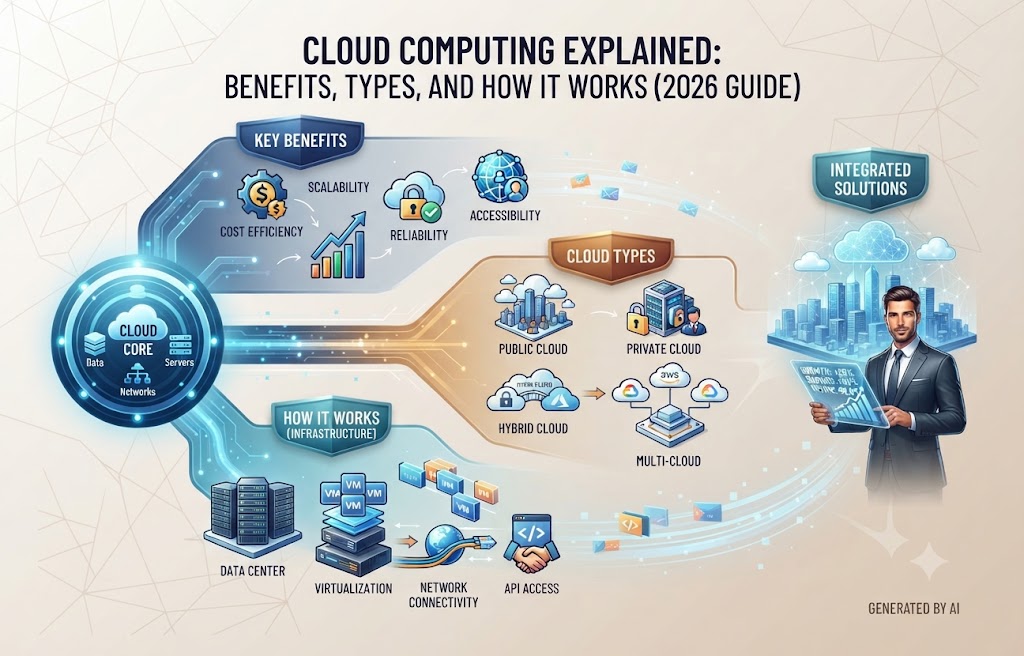
Cloud computing operates through large networks of interconnected data centers located around the world. These data centers contain thousands of servers that provide computing resources on demand.
When users access a cloud application or store data online, requests are processed by cloud servers rather than local computers. Virtualization technology distributes computing resources efficiently, allowing multiple users to share infrastructure securely while maintaining data isolation.
Businesses only pay for the resources they consume, making cloud computing both flexible and cost-effective.
Types of Cloud Deployment Models
Different organizations have different security, compliance, and operational requirements. Cloud computing offers several deployment models to meet these needs.
Public Cloud
A public cloud is operated by a third-party provider that delivers computing resources over the internet. It offers excellent scalability, affordability, and minimal infrastructure management, making it ideal for startups, small businesses, and growing organizations.
Private Cloud
A private cloud is dedicated to a single organization. It provides greater control, enhanced security, and customized infrastructure, making it suitable for businesses handling highly sensitive data or strict compliance requirements.
Hybrid Cloud
A hybrid cloud combines public and private cloud environments. Businesses can store sensitive information in a private cloud while using the public cloud for less critical workloads, achieving both flexibility and security.
Multi-Cloud
Many organizations use services from multiple cloud providers to improve reliability, reduce dependency on a single vendor, and optimize performance for different workloads.
Cloud Computing Service Models
Cloud computing services are generally divided into three primary models.
Infrastructure as a Service (IaaS)
IaaS provides virtual servers, storage, networking, and computing resources that businesses can configure according to their requirements. It offers maximum flexibility while eliminating the need for physical infrastructure.
Platform as a Service (PaaS)
PaaS provides a complete development environment where developers can build, test, and deploy applications without managing servers or operating systems. This accelerates software development and simplifies deployment.
Software as a Service (SaaS)
SaaS delivers software applications directly through a web browser. Users simply log in and begin working without installing or maintaining software locally. Popular examples include CRM systems, project management platforms, HRMS software, and collaboration tools.
Key Benefits of Cloud Computing
Cloud computing offers numerous advantages for businesses across every industry.
Lower IT Costs
Organizations reduce spending on hardware, maintenance, electricity, cooling systems, and server upgrades. Pay-as-you-go pricing ensures businesses only pay for the resources they actually use.
Scalability
Cloud resources can be increased or reduced instantly as business needs change. Whether handling seasonal demand or rapid business growth, cloud infrastructure adapts without significant investment.
High Availability
Cloud providers maintain redundant infrastructure across multiple locations, ensuring applications remain available even during hardware failures or unexpected disruptions.
Better Security
Leading cloud providers invest heavily in cybersecurity by offering encryption, firewalls, identity management, threat detection, automated backups, and compliance with international security standards.
Remote Accessibility
Employees can securely access business applications, files, and databases from anywhere using desktops, laptops, tablets, or smartphones.
Automatic Updates
Cloud providers regularly update infrastructure, operating systems, and security features, reducing maintenance responsibilities for businesses.
Business Applications of Cloud Computing
Cloud technology supports organizations across virtually every industry.
Common applications include:
- Website hosting
- Business email solutions
- Customer Relationship Management (CRM)
- Enterprise Resource Planning (ERP)
- Human Resource Management Systems (HRMS)
- Inventory management
- Accounting software
- Learning Management Systems (LMS)
- Data backup and disaster recovery
- Artificial Intelligence and Machine Learning
- Business Intelligence dashboards
- Video conferencing and collaboration tools
Cloud computing enables businesses to operate efficiently while supporting remote work and global collaboration.
Cloud Computing vs Traditional Infrastructure
Traditional IT infrastructure requires organizations to purchase, install, maintain, and upgrade physical servers. Expanding capacity often involves significant time and financial investment.
Cloud computing eliminates these limitations by providing on-demand infrastructure that scales instantly. Businesses benefit from lower operational costs, faster deployment, easier maintenance, and improved reliability without managing physical hardware.
This flexibility makes cloud computing a preferred choice for organizations seeking long-term digital growth.
Emerging Cloud Computing Trends in 2026
Cloud technology continues evolving rapidly alongside advancements in Artificial Intelligence and automation.
Key trends include:
- AI-powered cloud management
- Edge computing
- Serverless architecture
- Cloud-native application development
- Green cloud infrastructure
- Multi-cloud strategies
- Predictive cloud monitoring
- Advanced cloud cybersecurity
- Intelligent workload automation
- Cloud-based data analytics
These innovations help organizations improve performance while reducing operational complexity.
Best Practices for Cloud Adoption
Successful cloud implementation requires careful planning and ongoing management.
Businesses should:
- Assess existing infrastructure before migration
- Select the appropriate cloud deployment model
- Encrypt sensitive business data
- Implement multi-factor authentication
- Monitor cloud usage and performance
- Regularly back up critical information
- Optimize cloud costs continuously
- Train employees on cloud security practices
- Integrate cloud services with existing business systems
Following these best practices helps maximize cloud performance while minimizing risks.
How Coding Rig Helps Businesses Embrace Cloud Computing
At Coding Rig, we develop cloud-powered business solutions that improve efficiency, scalability, and digital transformation. Our cloud services include cloud migration, SaaS application development, cloud-native software, infrastructure optimization, API integration, cloud security, backup solutions, and managed cloud support.
Whether you're moving an existing application to the cloud or building a new cloud-based platform from scratch, our team creates secure, high-performance solutions tailored to your business goals.
We help businesses leverage cloud technology to improve collaboration, reduce operational costs, and prepare for future growth.
Conclusion
Cloud computing has become the foundation of modern business technology. By providing flexible infrastructure, scalable resources, enhanced security, and cost-effective operations, it enables organizations to innovate faster and compete more effectively in an increasingly digital world.
As cloud platforms continue evolving in 2026, businesses that embrace cloud technology will be better positioned to respond to changing market demands, improve customer experiences, and accelerate digital transformation.
Whether you're launching a startup, expanding an enterprise, or modernizing existing systems, cloud computing offers the tools and flexibility needed to build a resilient, future-ready business. Investing in the right cloud strategy today lays the groundwork for sustainable growth, improved efficiency, and long-term success.