Core Web Vitals Explained: The Complete Guide to Better Website Performance
Introduction
Website speed is no longer just a technical concern—it's a critical factor that affects user experience, search engine rankings, and conversion rates. Whether you're running a business website, eCommerce store, blog, or web application, delivering a fast and seamless experience has become essential.
Google introduced Core Web Vitals to measure how users actually experience a webpage. These metrics focus on loading speed, responsiveness, and visual stability, helping website owners identify performance issues that impact visitors.
In this guide, we'll explain what Core Web Vitals are, why they matter, and how you can optimize your website for better SEO and higher user satisfaction.
What Are Core Web Vitals?
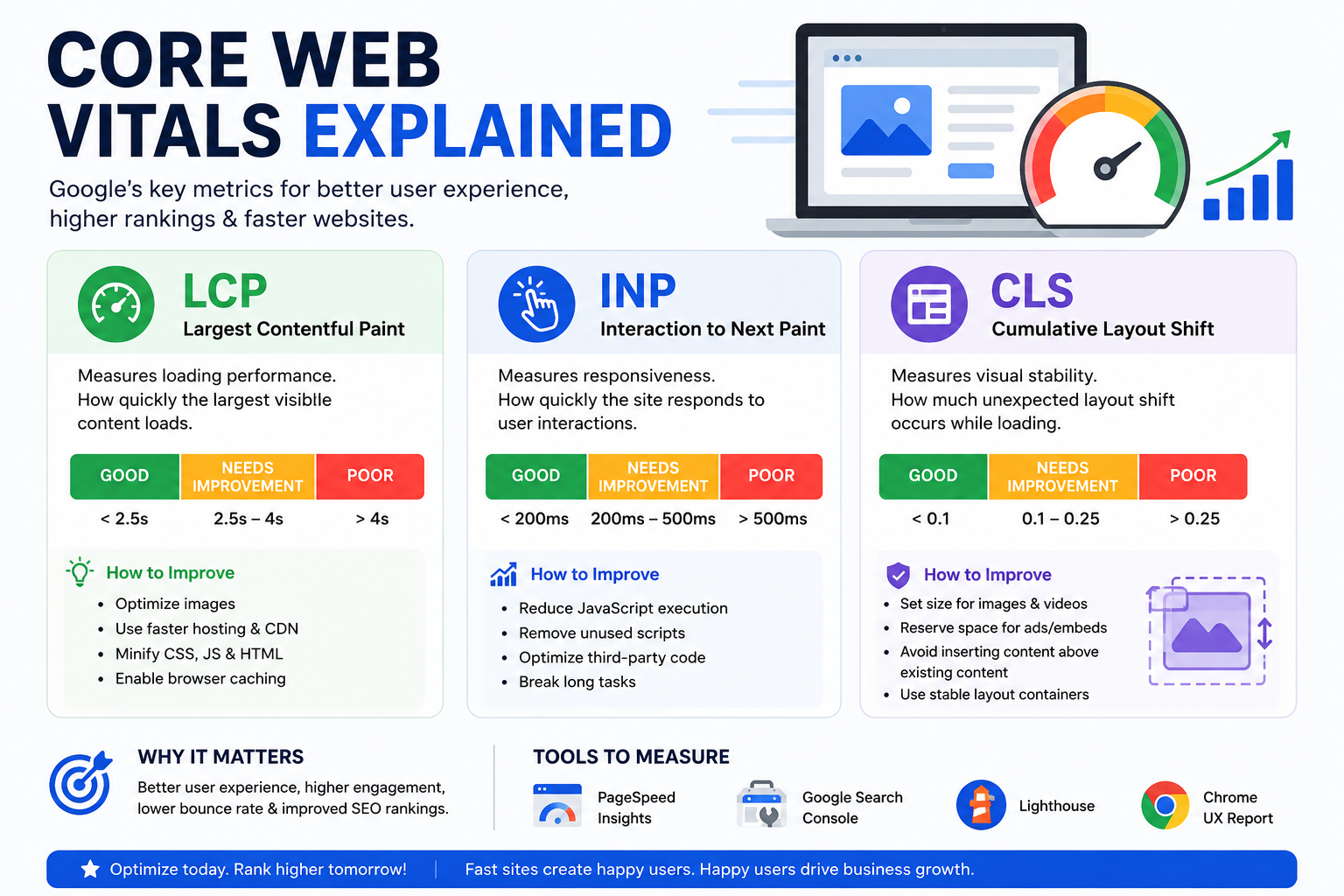
Core Web Vitals are a set of performance metrics developed by Google to evaluate the real-world user experience of a website.
They measure three essential aspects of web performance:
- Largest Contentful Paint (LCP) – Loading Performance
- Interaction to Next Paint (INP) – Responsiveness
- Cumulative Layout Shift (CLS) – Visual Stability
Together, these metrics provide a clear picture of how users experience your website.
1. Largest Contentful Paint (LCP)
What is LCP?
Largest Contentful Paint measures how long it takes for the largest visible content element on the page to fully load.
Examples include:
- Hero images
- Large headings
- Featured banners
- Video thumbnails
Ideal Score
- ✅ Good: Less than 2.5 seconds
- ⚠ Needs Improvement: 2.5–4 seconds
- ❌ Poor: More than 4 seconds
How to Improve LCP
- Optimize images
- Use modern image formats (WebP, AVIF)
- Enable browser caching
- Minify CSS and JavaScript
- Upgrade hosting
- Use a Content Delivery Network (CDN)
- Reduce server response time
2. Interaction to Next Paint (INP)
What is INP?
Interaction to Next Paint measures how quickly your website responds after a visitor clicks, taps, or types.
Examples:
- Clicking buttons
- Opening menus
- Submitting forms
- Adding products to cart
Ideal Score
- ✅ Good: Less than 200 milliseconds
- ⚠ Needs Improvement: 200–500 ms
- ❌ Poor: Over 500 ms
How to Improve INP
- Reduce JavaScript execution
- Remove unused scripts
- Optimize third-party plugins
- Use lazy loading
- Break long tasks into smaller ones
- Improve browser rendering
3. Cumulative Layout Shift (CLS)
What is CLS?
CLS measures unexpected movement of page elements while the page is loading.
Common examples include:
- Buttons moving before users click
- Images loading without reserved space
- Ads pushing content downward
- Pop-ups appearing unexpectedly
Ideal Score
- ✅ Good: Less than 0.1
- ⚠ Needs Improvement: 0.1–0.25
- ❌ Poor: More than 0.25
How to Improve CLS
- Always define image dimensions
- Reserve space for advertisements
- Avoid inserting content above existing elements
- Preload important fonts
- Use stable layout containers
Why Core Web Vitals Matter for SEO
Google uses Core Web Vitals as part of its Page Experience signals.
Although quality content remains the most important ranking factor, websites with excellent performance often enjoy several advantages:
- Better search visibility
- Higher engagement
- Lower bounce rates
- Increased conversions
- Improved customer satisfaction
- Stronger mobile performance
Fast websites encourage visitors to stay longer and interact more, sending positive engagement signals to search engines.
How to Measure Core Web Vitals
Several free tools help analyze website performance:
- Google PageSpeed Insights
- Google Search Console
- Lighthouse
- Chrome DevTools
- Chrome User Experience Report (CrUX)
- Web Vitals Chrome Extension
These tools provide detailed reports and actionable recommendations for improvement.
Common Issues That Affect Core Web Vitals
Many websites experience performance issues due to:
- Large unoptimized images
- Heavy JavaScript files
- Too many plugins
- Slow hosting servers
- Render-blocking CSS
- Poor font loading
- Excessive third-party scripts
- Missing browser caching
Identifying and resolving these issues can significantly improve overall website performance.
Best Practices to Improve Core Web Vitals
Follow these proven optimization techniques:
- Compress all images before uploading
- Enable GZIP or Brotli compression
- Use a CDN for global content delivery
- Minify CSS, JavaScript, and HTML
- Implement lazy loading for images and videos
- Remove unused CSS and JavaScript
- Optimize fonts and preload critical resources
- Reduce server response time
- Use modern hosting infrastructure
- Continuously monitor website performance
Core Web Vitals and Mobile Performance
Since most users browse on mobile devices, Google primarily evaluates mobile performance.
A mobile-friendly website should:
- Load quickly on slower networks
- Respond instantly to user interactions
- Maintain stable page layouts
- Display content correctly on all screen sizes
Improving mobile performance often leads to better desktop performance as well.
Frequently Asked Questions (FAQs)
Are Core Web Vitals a ranking factor?
Yes. Core Web Vitals are part of Google's Page Experience signals and contribute to overall search ranking performance.
Can good Core Web Vitals improve conversions?
Yes. Faster websites typically experience higher engagement, better user satisfaction, and improved conversion rates.
How often should I check Core Web Vitals?
Monitor them monthly or after major website updates to ensure consistent performance.
Is website speed the only SEO factor?
No. Content quality, backlinks, technical SEO, search intent, and user experience all play significant roles alongside website performance.
Conclusion
Core Web Vitals provide valuable insights into how real users experience your website. By optimizing loading speed, responsiveness, and visual stability, you create a faster, more enjoyable browsing experience that benefits both users and search engines.
Regularly monitoring and improving these metrics can help increase engagement, reduce bounce rates, strengthen SEO performance, and support long-term business growth. Investing in Core Web Vitals isn't just about meeting Google's standards—it's about delivering a better experience that keeps visitors coming back.
AEO (Answer Engine Optimization) Section
What are Core Web Vitals?
Core Web Vitals are Google's user experience metrics that measure loading performance (LCP), responsiveness (INP), and visual stability (CLS) to evaluate website quality.
Why are Core Web Vitals important?
They improve user experience, support better SEO performance, reduce bounce rates, and can increase conversions by making websites faster and more responsive.
What are the three Core Web Vitals?
- Largest Contentful Paint (LCP)
- Interaction to Next Paint (INP)
- Cumulative Layout Shift (CLS)
What is a good Core Web Vitals score?
- LCP: Under 2.5 seconds
- INP: Under 200 milliseconds
- CLS: Under 0.1
How do I improve Core Web Vitals?
Optimize images, reduce JavaScript, improve hosting, enable caching, use a CDN, minimize CSS, preload fonts, and eliminate layout shifts.