App Development Lifecycle: A Complete Guide to Building High-Performance Mobile Applications
Mobile applications have become an essential part of modern business. From e-commerce and healthcare to finance and enterprise operations, businesses use mobile apps to improve customer engagement, automate processes, and deliver convenient digital experiences.
However, successful app development involves much more than coding. A structured app development lifecycle helps businesses turn an idea into a secure, scalable, and high-performance mobile application.
What Is the App Development Lifecycle?
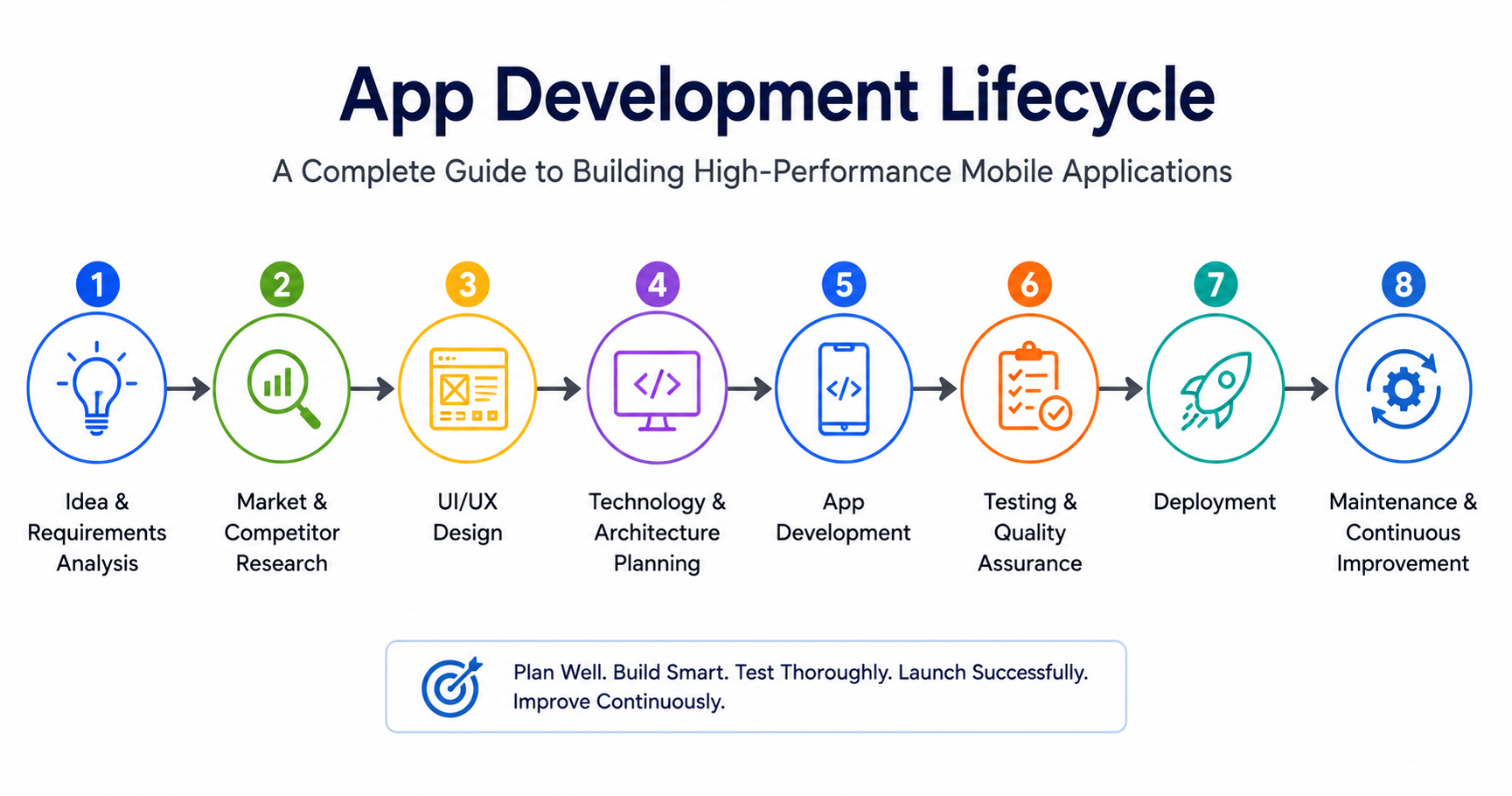
The app development lifecycle is a structured process used to plan, design, develop, test, launch, and maintain a mobile application.
The major stages include:
- Idea and requirement analysis
- Market research
- UI/UX design
- Technology and architecture planning
- App development
- Testing and quality assurance
- Deployment
- Maintenance and optimization
Following these stages can reduce development risks, improve product quality, and create a better experience for users.
1. Idea and Requirement Analysis
Every successful application begins with a clear purpose. Before development starts, businesses need to identify the problem the app will solve and understand who will use it.
Important considerations include:
- Business objectives
- Target audience
- Core features
- User requirements
- Budget and timeline
- Required integrations
- Android, iOS, or cross-platform development
It is also important to separate essential features from future enhancements. Starting with a focused Minimum Viable Product (MVP) can help businesses validate their idea before investing in advanced functionality.
2. Market and Competitor Research
Market research helps determine whether an application can provide genuine value. Businesses should analyze similar applications, customer reviews, pricing models, features, and common user complaints.
The goal isn't to copy competitors. Instead, research should reveal market gaps and opportunities to create a better solution.
For example, if users frequently complain about complicated navigation in competing apps, a simpler interface could become a competitive advantage.
3. UI/UX Design
User experience plays a major role in mobile app success. Even an application with powerful functionality can struggle if users find it difficult to navigate.
The design process generally includes:
User flows → Wireframes → Prototypes → Visual design → Usability testing
A good mobile interface should be intuitive, responsive, accessible, and consistent across different devices.
Designers should also consider navigation, buttons, forms, loading screens, error messages, touch interactions, and different screen sizes.
4. Technology and Architecture Planning
Choosing the right technology is another critical stage of the app development lifecycle.
Businesses can choose between:
- Native development: Separate applications for Android and iOS.
- Cross-platform development: A shared codebase for multiple platforms.
- Backend development: APIs, databases, authentication, cloud services, and server infrastructure.
The technology stack should support the application's current requirements while allowing it to scale as the business grows.
For example, an e-commerce app may require payment gateways, product management, inventory APIs, customer accounts, notifications, analytics, and an admin panel.
5. Mobile App Development
Once the design and architecture are finalized, developers begin building the application.
Development is generally divided into smaller modules such as:
- User registration and login
- Dashboards
- Product or service management
- Payments
- Notifications
- API integrations
- Reports and analytics
Developers should follow coding standards, use version control, conduct code reviews, and maintain proper documentation.
API integration is particularly important for applications that need to communicate with external platforms, payment systems, CRMs, ERPs, or custom backend services.
6. Testing and Quality Assurance
Testing should take place throughout development rather than only before launch.
A comprehensive testing process may include:
- Functional testing
- UI testing
- API testing
- Performance testing
- Security testing
- Compatibility testing
- Usability testing
- Device testing
For high-performance applications, developers should monitor loading speed, memory consumption, network requests, crashes, and battery usage.
Testing across real devices is also important because applications may behave differently depending on operating system versions, screen sizes, and hardware configurations.
7. Deployment and Launch
After testing is completed, the application is prepared for publication on platforms such as Google Play Store and Apple App Store.
Before launch, teams should verify:
- App icons and screenshots
- Store descriptions
- Privacy information
- Required permissions
- Application version
- Security settings
- Analytics and crash monitoring
A gradual rollout can also help identify unexpected issues before the application reaches a larger audience.
8. Maintenance and Continuous Improvement
App development doesn't end after launch. Mobile operating systems, devices, security standards, and user expectations continuously change.
Post-launch maintenance may include:
- Bug fixing
- Security updates
- Performance optimization
- OS compatibility updates
- New features
- Database maintenance
- User feedback analysis
Analytics can help businesses understand how users interact with the application and identify areas that need improvement.
How to Build a High-Performance Mobile App
Performance should be considered from the beginning of development. Some effective practices include:
- Optimize images and media
- Minimize unnecessary API requests
- Optimize database queries
- Use caching appropriately
- Reduce application size
- Optimize background processes
- Monitor crashes and performance
- Use scalable infrastructure
- Keep dependencies updated
Security should also be incorporated into the architecture through secure authentication, encrypted communication, safe data storage, appropriate permissions, and regular security checks.
Common App Development Mistakes
Several mistakes can negatively affect an application's success.
Skipping user research: Building without understanding users can result in low adoption.
Adding too many features: Excessive functionality can make an app complicated and expensive.
Delaying testing: Finding major bugs near launch can increase development costs.
Ignoring scalability: Poor architecture can create performance problems as the user base grows.
Neglecting maintenance: Without regular updates, applications can become outdated and vulnerable.
Conclusion
The app development lifecycle provides a structured roadmap for transforming an idea into a reliable mobile application. From research and UI/UX design to development, testing, deployment, and ongoing maintenance, every stage contributes to the final product.
For businesses developing mobile applications in 2026, the focus should be on creating a secure, scalable, user-friendly, and high-performance solution rather than simply launching an app quickly.
With proper planning, the right technology, continuous testing, and ongoing optimization, businesses can build mobile applications that provide long-term value and adapt to changing customer needs.